

Cisco Duo
This guide configures a Duo Admin API application so Trustle can securely read your Duo users and groups.
Prerequisites
Section titled “Prerequisites”- A Duo account with the Owner or Administrator role.
- Access to the Duo Admin Panel.
Configure Cisco Duo
Section titled “Configure Cisco Duo”Log in to the Duo Admin Panel
Section titled “Log in to the Duo Admin Panel”Go to https://admin.duosecurity.com and sign in with your administrator account.
Create an Admin API Application
Section titled “Create an Admin API Application”- In the left sidebar, go to Applications.
- Click Protect an Application.
- Search for Admin API in the application list.
- Click Protect next to Admin API.
Configure API Permissions
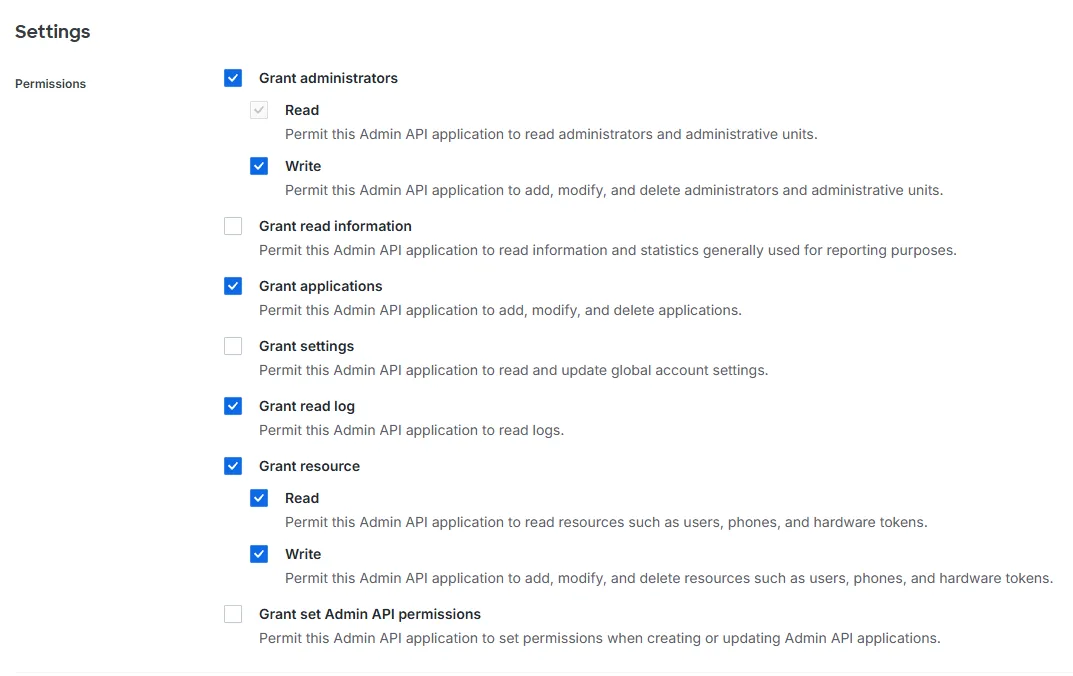
Section titled “Configure API Permissions”On the Admin API application page, grant the following permissions:
- Grant administrators — Read + Write
- Grant applications — top-level only
- Grant read log — top-level only
- Grant resource — Read + Write
Leave all write permissions unchecked. Trustle only needs read access.
Collect Credentials
Section titled “Collect Credentials”From the Admin API application details page, copy the following three values:
- Integration key (ikey): a string like
DIXXXXXXXXXXXXXXXXXX. - Secret key (skey): a string like
deadbeefdeadbeefdeadbeefdeadbeefdeadbeef. - API hostname: a string like
api-XXXXXXXX.duosecurity.com.
Connect in Trustle
Section titled “Connect in Trustle”- Go to the Connections page in Trustle from the left menu.
- Under Identity Providers, find the Duo logo and choose Connect.
- Fill in the connection form:
- Connection Name: enter a descriptive name (for example, “My Duo Connection”).
- Integration Key: paste the integration key you collected.
- Secret Key: paste the secret key you collected.
- API Hostname: paste the hostname you collected.
- Click Test Connection.
- After the test succeeds, click Save Connection.